jAlbum
DOWNLOAD
The aggregate score based on the app's rating, number of users, and a number of other parameters closely linked to user satisfaction.
The best possible score is 10.
4.0
Questions & answers
Wiki
|4322086/11.2|4247424/11.0|4160465/10.10|3762235/10.7|3750051/10.6|3700388/10.5|3678046/10.4|3593604/10.3|3557077/10.2|3453220/10.1|3427183/10.0|3377745/9.6|3254570/9.5|3183656/9.4|3084007/9.2|3009950/9.1|2986736/9.0|2480678/8.9|2178484/8.7|2001158/8.6|1416197/8.5|1356640/8.4|1137323/8.3|980396/8.2|679467/8.1|298858/8.0|7300/7.4|444915/7.3|12236/7.2|439157/7.1|454913/7.0|455513/6.5|452161/6.2
jAlbum
Suggest a correction
Video tutorial & screenshots
Editorial review
All comments (1)
The following review written by one of the Software Informer contributors applies to version 10.10
jAlbum is a cross-platform photo album editor with an option to publish photo projects to a cloud sharing service.
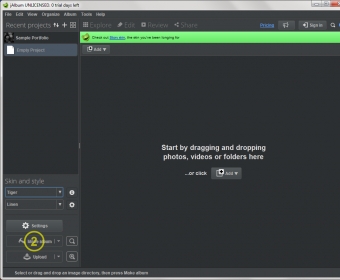
The interface of jAlbum is remarkably easy to use. To create a new album you simply drag and drop your photos and apply various skins and styles to your gallery - then you have your photo project ready to be uploaded so you can enjoy it on the web.
The set of tools offered by jAlbum allows you to do some basic photo editing like cropping and flipping as well as perform more complex operations like removing red-eye effect, adjusting the contrast and brightness levels, changing the gamma level, applying a sepia tone, pixelating, inverting colour and so on. You can view your album as a slideshow or even order a physical copy of it via the official partner of jAlbum, and your physical album will be delivered to you anywhere in the world.
You can mark your photos in several ways - either by applying one of the five colour tags to them or by rating them with stars. It is done in order to add an alternative and more visual way of tagging your photos, so that you could search for them more easily.
jAlbum offers an extremely simple way to generate and customize your albums. You can do it by simply creating and sharing your album (which is done in a matter of seconds) or you can use the impressive range of tools the program offers to edit your photos and albums in many ways. It can be used both by professional photographers who want to share their masterpieces on the web and by those who just want a basic photo editor and a way of sharing their albums with friends in one place.
The fact that the software is tremendously easy to use, offers an extensive collection of tools and works under all major OSs makes the application one of the best products of its kind.
Pros
- Cross-platform.
- Easy to use.
- Lots of skins and layouts.
- Full xmp metadata support.
- Supports specialized image formats: TIFF, PSD, etc.
- You can order a physical copy of your created album.
- Offers an interesting way to tag your photos.
- You can easily embed albums in blogs and websites.
- Available in 32 languages.
What's new in version 10.10
- Windows version packaged with an updated installer software.
- Easier to correctly activate license (erroneous trailing spaces are trimmed from the activation code).
- Bundled Base skin updated.
Bug fixes
- Windows version could sometimes trigger security warnings.
- The "IPTC author" field of images could sometimes leak into the xmp title field of images.
- Uploads could sometimes end up with an error in "Notifier" (missing album URL).
- Fix for custom image size error (image specific maxImageWidth etc variables ignored when generating variables).
- Loading album projects by dropping project files onto the dock icon on Mac could sometimes cause errors.
- Fix for not being able to open folders containing double spaces in file names (Windows only).
- More robust against errors reading xml metadata from .info files.
- Fix for calculation of album URL (we sometimes got "No web directory selected").
- Running the Mac version as another user than the installed user would prevent the system standard file chooser from opening.
- Fix for nullpointer exception bug when painting thumbnails in the UI.
[char_desc_2000] => Create online photo albums from your images and movies with this software. jAlbum has built in support for organizing and editing images, but with focus on flexible presentation. Choose from tons of powerful skins (themes), or create your own skin to get the gallery presentation you want, then upload it to any site with jAlbum's built in FTP support. jAlbum is a powerful, yet easy to use tool that is liked by photography enthusiasts and professionals over the world.
What's new in version 10.3
News and Updates
Portuguese translation updated.
Bug fixes
Windows version would hang when dragging and dropping images from the file chooser onto jAlbum. This bug has been around for over a year and is now finally fixed.
Mac version would fail with "Could not initialize class com.adobe.xmp.impl.XMPMetaParser" error on OS X Lion
Error reporting for skins that require "compatibility mode" to run wasn't tight
What's new in version 10.1
- Windows version packaged with an updated installer software.
- Easier to correctly activate license (erroneous trailing spaces are trimmed from the activation code).
- Bundled Base skin updated.
Bug fixes
- Windows version could sometimes trigger security warnings.
- The "IPTC author" field of images could sometimes leak into the xmp title field of images.
- Uploads could sometimes end up with an error in "Notifier" (missing album URL).
- Fix for custom image size error (image specific maxImageWidth etc variables ignored when generating variables).
- Loading album projects by dropping project files onto the dock icon on Mac could sometimes cause errors.
- Fix for not being able to open folders containing double spaces in file names (Windows only).
- More robust against errors reading xml metadata from .info files.
- Fix for calculation of album URL (we sometimes got "No web directory selected").
- Running the Mac version as another user than the installed user would prevent the system standard file chooser from opening.
- Fix for nullpointer exception bug when painting thumbnails in the UI.
What's new in version 9.6
News and Updates
The thumbnail view can now be filtered on image rating (and in the future on keywords etc). Press CTRL F to activate the filtering (CMD F on Mac). See blog post for more details.
Images can be easily rated using keys 0-5 in both thumbnail view mode, edit mode and full screen slide show mode. The rating also shows in full screen slide show mode (can be toggled with the "R" key)
The full screen slide show can be played and paused using the space bar key
When adding files that already exists, allows the user to skip or replace on a per-file basis
New dialog explaining different drag and drop behaviors
If errors occur, the error dialog now has a "Copy" button to copy the error message to the clipboard (simplify error reporting to us)
Added skin API for commercial / licensed skins
Hovering the mouse over the "Filters applied" status icon of a thumbnail now lists the image filters applied
Embedded IPTC titles are now respected by the UI and ${title} variable
Flash videos are now also considered "media files" and gets a superimposed film icon
File type icons now changed from GIF to PNG type
New bundled Flash based skin: "Lumen"
New bundled Flash based skin: "Mr.Burns"
Skin "Simplicity" no longer bundled. Available from http://jalbum.net/skins/skin/Simplicity
Bug fixes
Embedded EXIF captions on some images couldn't be properly read
Embedded GPS coordinates on some images couldn't be properly read
Switching between languages would reset the "After publishing" behavior to "Open publish successful page"
What's new in version 8.7
New in this version is that users can add Widgets;
these are small add-ons for the albums that add different functions such as visitor counter, commenting, about, and others. Also a photo editor has been added for basic editing and manipulations, such as red-eye removal and cropping.
What's new in version 8.3
New in this version is that users can add Widgets;
these are small add-ons for the albums that add different functions such as visitor counter, commenting, about, and others. Also a photo editor has been added for basic editing and manipulations, such as red-eye removal and cropping.
Publisher's description
This official description applies to version 11.0
jAlbum downscales your images to upload them on the web, creates complete web pages, and uploads them to jalbum.net or any other website. If you want to have private galleries you can activate password protection and only visitors with the correct password can view your albums. If you want to share and be social you can add Facebook commenting to your albums and share them on social networks.
Latest comments
All comments (1)